Add Worker Cluster
After your control plane is running, you can add more Kubernetes worker clusters and manage them through Argo CD.
You can onboard:
- a new cluster provisioned with kubara Terraform templates, or
- an existing cluster you already operate.
The Argo CD integration flow is the same in both cases.
1. Add worker cluster to config.yaml
Add a new cluster entry:
clusters:
  - name: workload-0
    stage: dev
    type: worker
    dnsName: workload-0.dev.example.com
    ssoOrg: my-org
    ssoTeam: my-team
    terraform:
      provider: stackit # currently supported: stackit
      projectId: <project-id>
      kubernetesType: ske
      kubernetesVersion: 1.34
      dns:
        name: workload-0.dev.example.com
        email: platform@example.com
    argocd:
      repo:
        https:
          customer:
            url: https://git.example.com/platform/repo.git
            targetRevision: main
          managed:
            url: https://git.example.com/platform/repo.git
            targetRevision: main
    services:
      argocd:
        status: enabled
      certManager:
        status: enabled
        clusterIssuer:
          name: letsencrypt-staging
          email: platform@example.com
          server: https://acme-staging-v02.api.letsencrypt.org/directory
      externalDns:
        status: enabled
      externalSecrets:
        status: enabled
      kubePrometheusStack:
        status: enabled
        storageClassName: standard-rwo # optional
      traefik:
        status: enabled
      kyverno:
        status: enabled
      kyvernoPolicies:
        status: enabled
      kyvernoPolicyReport:
        status: enabled
      loki:
        status: enabled
        storageClassName: standard-rwo # optional
      homerDashboard:
        status: enabled
      oauth2Proxy:
        status: enabled
      metricsServer:
        status: disabled
      metalLb:
        status: disabled
      longhorn:
        status: disabled
Optional: Ingress annotation overrides
Each service supports an optional ingress.annotations map that is merged with kubara's default annotations when rendering the service values files.
This is useful when you use an ingress controller other than Traefik that requires controller-specific annotations.
services:
  kubePrometheusStack:
    status: enabled
    ingress:
      annotations:
        nginx.ingress.kubernetes.io/auth-url: "https://$host/oauth2/auth"
        nginx.ingress.kubernetes.io/auth-signin: "https://$host/oauth2/start?rd=$escaped_request_uri"
User-provided annotations are merged on top of kubara defaults using mergeOverwrite: values for the same key are overwritten, but kubara defaults that are not present in the override map are preserved.
2. Regenerate Terraform and Helm templates
# kubara generate creates both helm and terraform files by default
kubara generate
This creates/updates the worker cluster overlays in:
customer-service-catalog/terraform/<worker-cluster-name>/...customer-service-catalog/helm/<worker-cluster-name>/...
3. Prepare the worker cluster
If this is a new cluster, apply Terraform for the worker entry. If the cluster already exists, skip Terraform and continue.
You need the worker cluster kubeconfig for registration in Argo CD. Store it in your secret backend (Vault/Secret Manager), for example:
{
  "my_clusters": {
    "k8s-worker-0": "<worker kubeconfig yaml>"
  }
}
4. Prepare external-secrets credentials on the worker cluster
Create provider credentials as Kubernetes secret(s), for example:
# Bitwarden
kubectl -n external-secrets create secret generic bitwarden-access-token \
  --from-literal=token="<BITWARDEN_MACHINE_ACCOUNT_TOKEN>"

# STACKIT Secrets Manager
kubectl -n external-secrets create secret generic stackit-secrets-manager-cred \
  --from-literal=username="<USERNAME>" \
  --from-literal=password="<PASSWORD>"
Then configure the worker ClusterSecretStore in:
customer-service-catalog/helm/<worker-cluster-name>/external-secrets/additional-values.yaml
Example:
clusterSecretStores:
  - name: workload-0-dev
    labels:
      argocd.argoproj.io/instance: workload-0-external-secrets
    provider:
      vault:
        auth:
          userPass:
            path: userpass
            secretRef:
              name: stackit-secrets-manager-cred
              namespace: external-secrets
              key: password
            username: "<USERNAME>"
        path: "<VAULT_PATH>"
        server: "https://vault.example.com"
        version: v2
5. Register worker cluster in Argo CD
Update the control plane overlay:
customer-service-catalog/helm/<controlplane-cluster-name>/argo-cd/values.yaml
bootstrapValues:
  cluster:
    - name: my-new-worker0
      project: controlplane-production
      remoteRef:
        remoteKey: my_clusters
        remoteKeyProperty: k8s-worker-0
      secretStoreRef:
        kind: ClusterSecretStore
        name: <controlplane-cluster-name>-<stage>
      additionalLabels:
        cert-manager: enabled
        external-dns: enabled
        external-secrets: enabled
        traefik: enabled
        kube-prometheus-stack: enabled
        kyverno: enabled
        kyverno-policies: enabled
        kyverno-policy-reporter: enabled
        loki: enabled
        oauth2-proxy: enabled
The remoteRef points to the worker kubeconfig secret in your secret backend.
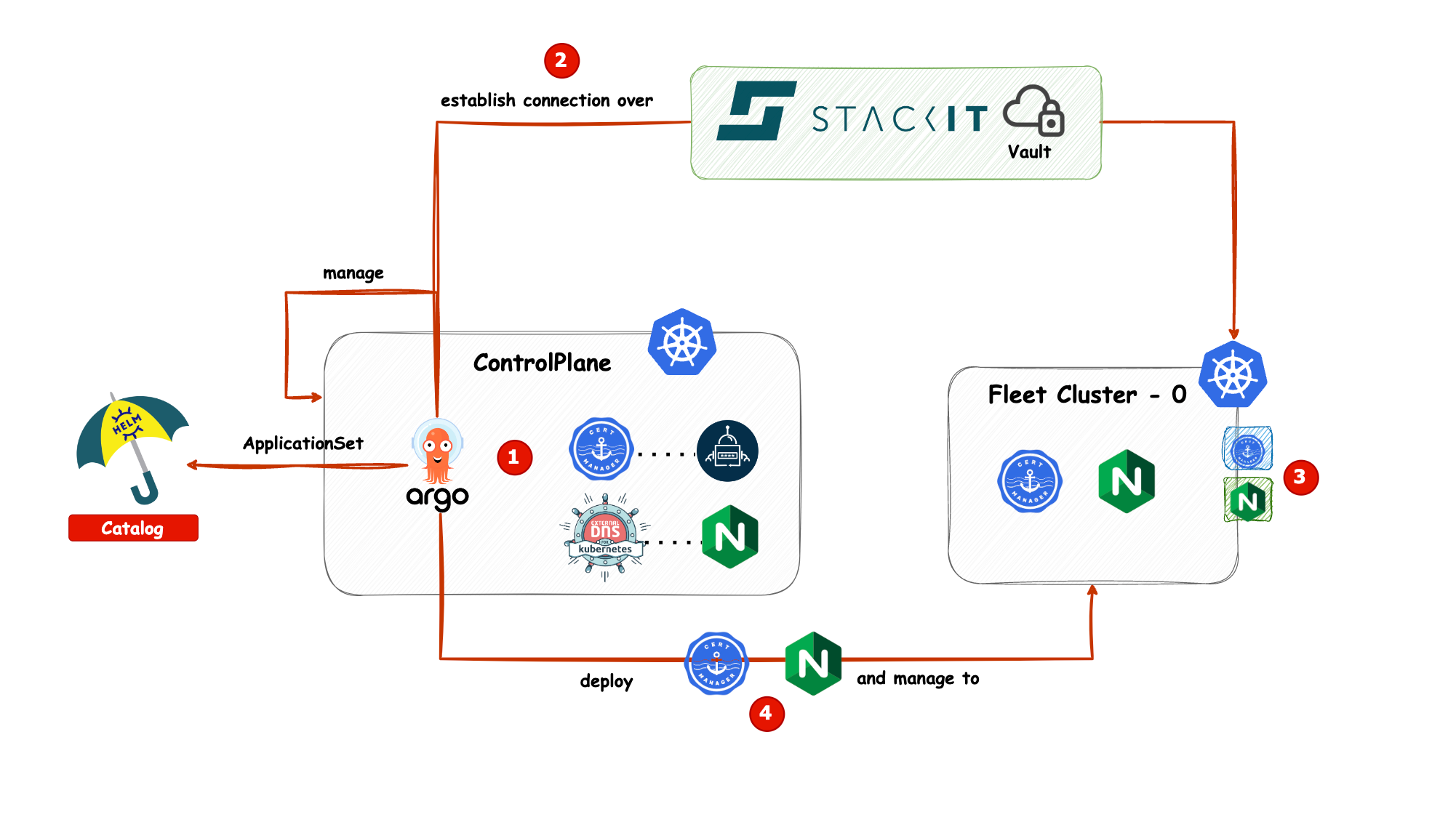
6. Commit and roll out
Commit and push all updated files.
If Argo CD manages itself, it will reconcile automatically. If not, run bootstrap again for your control plane cluster:
kubara bootstrap <controlplane-cluster-name-from-config-yaml>
Additional notes
- If you enable
oauth2-proxy, provide valid OAuth credentials in the secret backend used by external-secrets on the worker cluster. additional-values.yamlis optional but recommended for provider-specific overrides, because generatedvalues.yamlcan be re-rendered by kubara.