How to add a repository to Argo CD
To deploy applications with Argo CD we need to connect Repositories. This is also useful if you want to give developers a way to deploy their applications onto your platform without much intervention on your side.
An Argo CD App Repository is a logical concept to control where applications may be deployed from. For more information check: https://argo-cd.readthedocs.io/en/stable/user-guide/private-repositories/
Add credentials to vault
Add the repository credentials to your vault below <cluster-name>/<stage>.
The examples below use one secret value per repository credential.
For HTTPS username + password/PAT authentication, PAT usually means Personal Access Token and is often tied to a user account.
For platform automation, prefer a technical or machine account instead of a personal user account.
Set username to the account name expected by your Git provider; the exact value is provider-dependent.
{
  "repo_pat": {
    "pat": "<password-or-PAT>"
  }
}
For SSH deploy key authentication:
{
  "repo_ssh": {
    "privateKey": "-----BEGIN OPENSSH PRIVATE KEY-----\n...\n-----END OPENSSH PRIVATE KEY-----"
  }
}
For GitHub App authentication:
{
  "repo_github_app": {
    "privateKey": "-----BEGIN RSA PRIVATE KEY-----\n...\n-----END RSA PRIVATE KEY-----"
  }
}
Modify Argo CD overlays
Add one of the following repository definitions to your Argo CD overlay, typically
platform-configs/<hub-cluster-name>/helm/argo-cd/values-additional.yaml.
HTTPS username + password/PAT:
bootstrapValues:
  repositories:
    user-repo-mock:
      name: user-repo-mock
      authMode: https
      projectScope: k8s-spoke-0
      remoteRef:
        remoteKey: <cluster-name>/<stage>/repo_pat
        remoteKeyProperty: pat
      repoType: git
      secretStoreRef:
        kind: ClusterSecretStore
        name: hub-0-production
      url: https://git.example.com/org/repo.git
      username: <technical-account-username>
SSH deploy key:
bootstrapValues:
  repositories:
    user-repo-ssh:
      name: user-repo-ssh
      authMode: ssh
      projectScope: k8s-spoke-0
      sshPrivateKeyRemoteRef:
        remoteKey: <cluster-name>/<stage>/repo_ssh
        remoteKeyProperty: privateKey
      repoType: git
      secretStoreRef:
        kind: ClusterSecretStore
        name: hub-0-production
      url: git@git.example.com:org/repo.git
For SSH repositories, make sure Argo CD already trusts the SSH host key. See the bootstrap documentation for configs.ssh.extraHosts.
GitHub App:
bootstrapValues:
  repositories:
    user-repo-github-app:
      name: user-repo-github-app
      authMode: github-app
      projectScope: k8s-spoke-0
      githubAppID: "123456"
      githubAppInstallationID: "987654"
      githubAppPrivateKeyRemoteRef:
        remoteKey: <cluster-name>/<stage>/repo_github_app
        remoteKeyProperty: privateKey
      repoType: git
      secretStoreRef:
        kind: ClusterSecretStore
        name: hub-0-production
      url: https://github.com/org/repo.git
For GitHub Enterprise, also set githubAppEnterpriseBaseUrl.
That's what's happening behind the scenes:
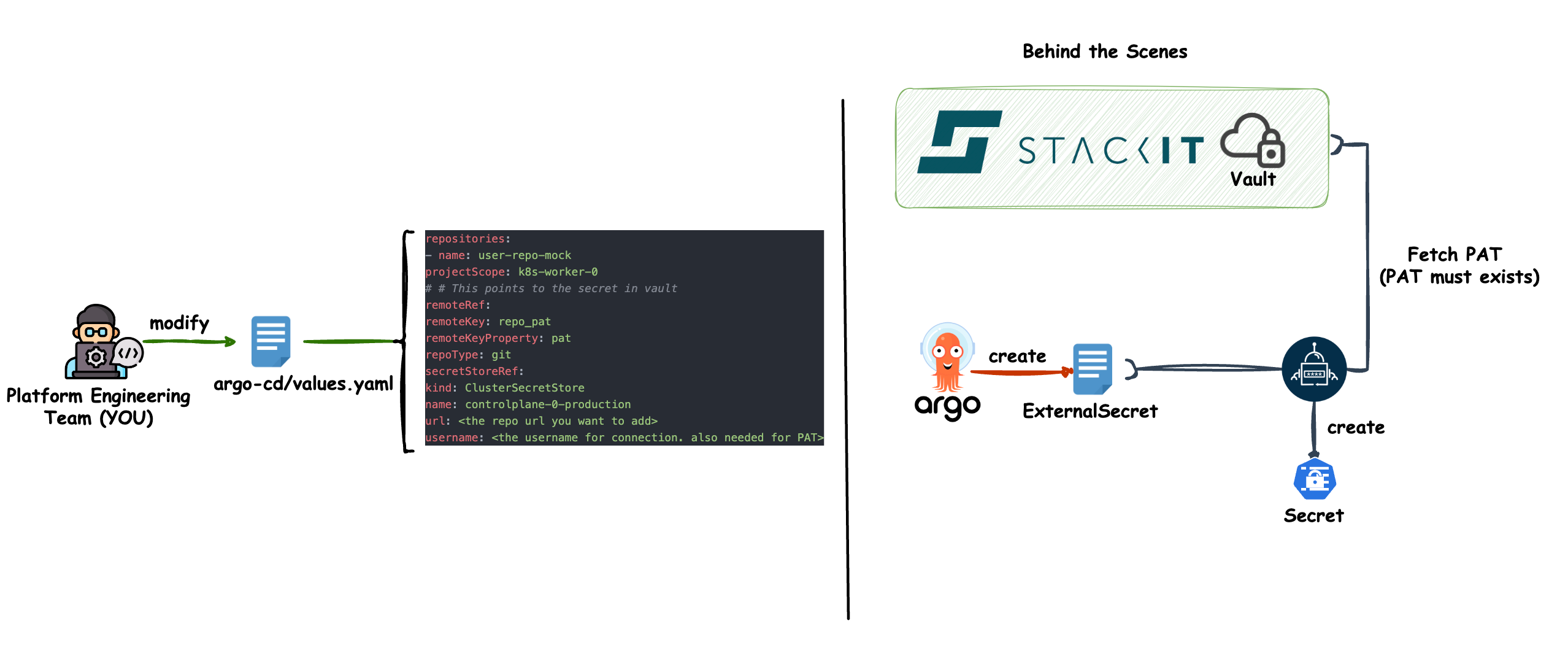
Push your changes to git
Do not forget to push your changes to the git repository that serves your Argo CD application. If you let Argo CD manage itself, it will add the configured repository to your cluster.