Security: Kyverno policies
Kubara includes Kyverno and a curated policy set to validate Kubernetes resources before they run.
Why policies matter
Platform teams need baseline guardrails that catch security and operational mistakes before deployment. Kyverno runs inside the cluster as an admission controller, validating and mutating manifests directly against the Kubernetes API.
Core architecture
Kubara splits policy management into three components:
- kyverno: Admission controller and background scanner.
- kyverno-policies: Curated validation rules shipped with the platform.
- kyverno-policy-reporter: UI and Prometheus metrics exporter for policy violations.
Configuration in config.yaml
Policies run in Audit mode by default. You can switch individual policy groups to Enforce mode directly in your cluster configuration.
Example
clusters:
  - name: my-cluster
    stage: prod

    services:
      kyverno:
        status: enabled
      kyverno-policies:
        status: enabled
        config:
          itGrundschutz:
            mode: Enforce      # Audit (default) or Enforce
          bestPractices:
            mode: Audit
          certManager:
            mode: Audit
          traefik:
            mode: Audit
          argoCD:
            mode: Audit
Modes
Audit: Violations are logged toPolicyReportcustom resources and visible in Policy Reporter without blocking deployments.Enforce: Admission webhooks reject non-compliant resources at apply time.
Evaluation and precedence
When determining whether a rule runs in Audit or Enforce mode, kubara generate evaluates the settings in this order:
- Specific rule overrides: Highest priority. Set
actionOverride: EnforceoractionOverride: Auditon individual rules inside overlay files such asplatform-configs/<cluster>/helm/kyverno-policies/values-override.yaml. - Group mode: Set in
config.yamlunderservices.kyverno-policies.config.<group>.mode(for example,itGrundschutz: mode: Enforce). This applies to all rules in that group unless a specific rule override exists. - Global default: Falls back to
Auditif no group mode or rule override is configured.
Policy groups
Workload hardening (itGrundschutz & PSS baseline)
- Disallow privileged containers: Blocks containers running in privileged mode.
- Disallow privilege escalation: Prevents child processes from gaining more privileges than their parent.
- Require read-only root filesystems: Requires container root filesystems to mount as read-only.
- Require resource requests and limits: Checks that CPU and memory requests and limits exist.
- Require health probes: Flags pods missing liveness or readiness probes.
Best practices (bestPractices)
- Disallow
:latestimage tag: Requires explicit image tags or digests in production workloads. - Disallow
defaultnamespace: Prevents deploying workloads into the default namespace. - Require PodDisruptionBudgets: Checks that multi-replica workloads define a PDB.
Ingress and certificates (traefik & certManager)
- Traefik TLS options: Prevents using insecure default TLS options on IngressRoutes.
- Cert-Manager limits: Restricts certificate duration and allowed DNS names on Certificate requests.
GitOps guardrails (argoCD)
- Argo CD project restrictions: Prevents applications from targeting unauthorized projects or the default project.
Policy reporting and visibility
In Audit mode, violations do not block deployments. Instead, Kyverno records them in PolicyReport and ClusterPolicyReport custom resources.
Inspecting reports via CLI
# Check namespace-scoped policy violations
kubectl get policyreport -A

# Check cluster-scoped policy violations
kubectl get clusterpolicyreport
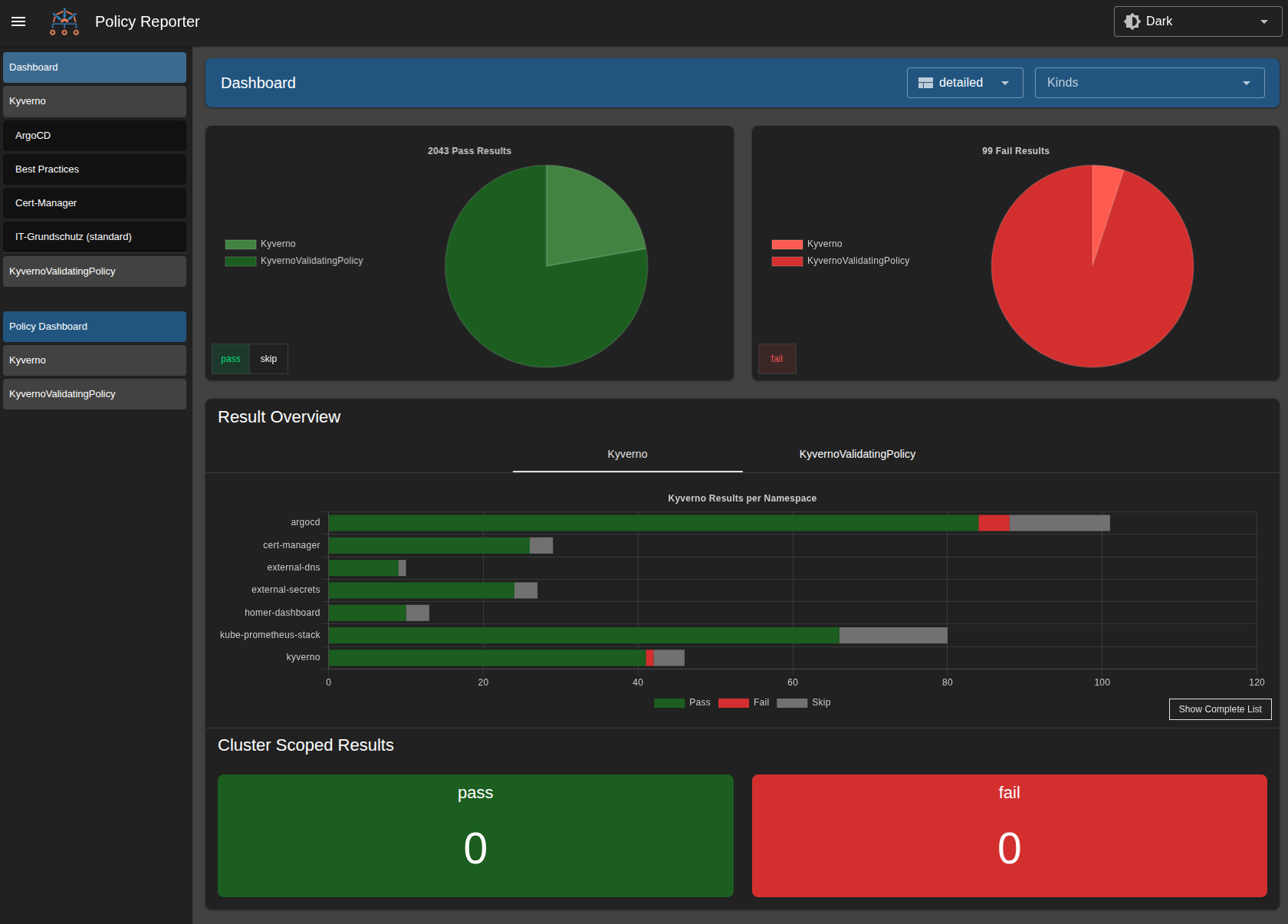
Policy Reporter UI
When kyverno-policy-reporter is enabled, a web dashboard is exposed via Ingress and linked in Homer:
https://<cluster-domain>/kyverno
Opt-in controls
These rules exist in the catalog but stay disabled by default to avoid breaking existing environments:
- Default-deny network policies: Generates default-deny ingress and egress rules for namespaces.
- Registry allow-listing: Restricts image pulls to approved container registries.
- Cosign image verification: Requires cryptographic signatures on container images.