How to add an application to Argo CD
Note
This page describes adding additional apps to your platform. Most likely this will be app-of-apps constructs to enable a self-service approach for developer teams. If you want to add applications to your base-stack use the app-sets in conjunction with cluster labels instead.
Make sure you added the needed Project and Repositories. You should also think about setting appropriate RBAC on the Project.
An Argo CD App is the logical concept to encapsulate manifests needed to deploy an application onto kubernetes. For more information and possible configuration check: https://github.com/argoproj/argo-cd/blob/master/docs/operator-manual/application.yaml https://argo-cd.readthedocs.io/en/stable/operator-manual/cluster-bootstrapping/#app-of-apps-pattern
Modify Argo CD overlays
This is an example on how to add a simple application to a spoke-cluster.
Usually you want to add a repository that serves an app-of-apps pattern.
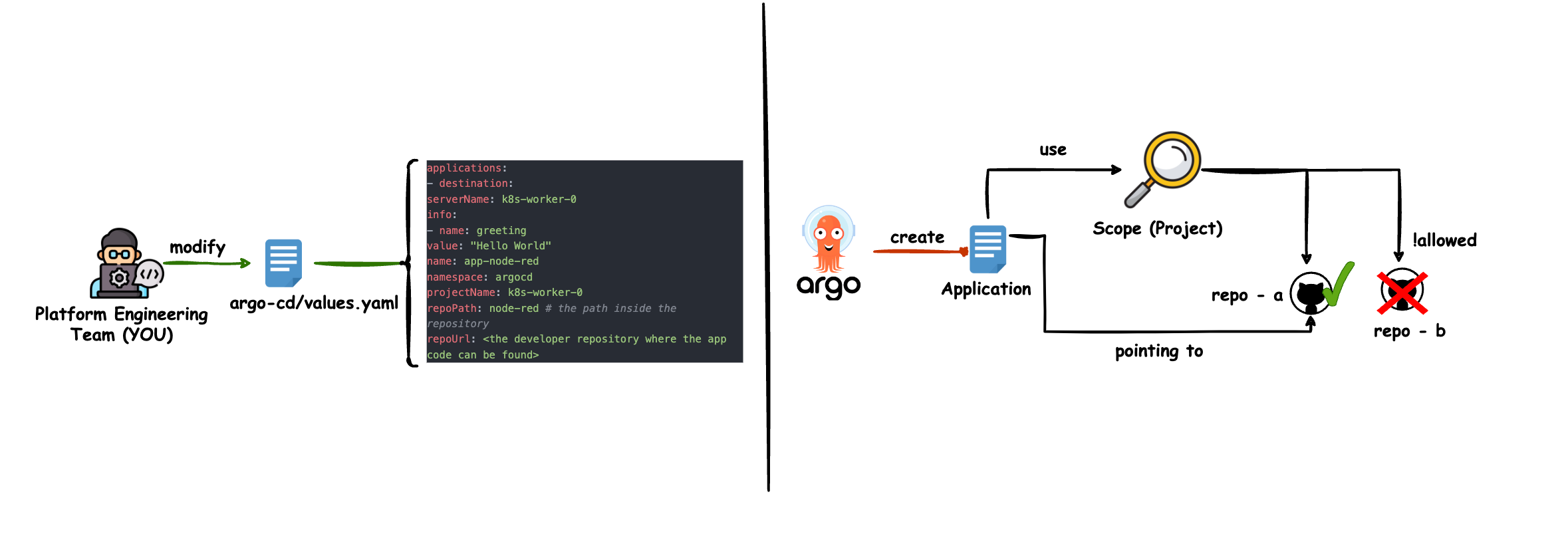
Add the following to your Argo CD overlay, typically platform-configs/<hub-cluster-name>/helm/argo-cd/values-additional.yaml.
bootstrapValues:
  applications:
    app-node-red:
      name: app-node-red
      projectName: k8s-spoke-0
      namespace: argocd
      destination:
        serverName: k8s-spoke-0
      repoUrl: <the developer repository where the app code can be found>
      repoPath: node-red # the path inside the repository
      info:
        - name: greeting
          value: "Hello World"
That whats happening behind the scenes:
Reference example: Kustomize workloads with App of Apps
To see how an App of Apps structure is organized across files in a GitOps repository, explore the Kustomize application onboarding reference in platform-setup-examples. It illustrates how parent values, child application definitions, and workload overlays are structured within platform-configs/.
Push your changes to git
Do not forget to push your changes to the git repository that serves your Argo CD application. If you let Argo CD manage itself, it will add the configured application to the cluster.
Run kubara bootstrap again (if Argo CD is not managing itself )
If Argo CD is not managing itself (see config.yaml with argocd.selfManaged: disabled), altering Argo CD values will have no effect until you run the following again:
kubara bootstrap <hub-cluster-name-from-config-yaml>